
The MSP ticket lifecycle now starts before a ticket is logged and keeps delivering value after it’s closed. In this post, Pia CEO David Schwartz explains how MSP service desks can scale by managing the full path a request takes: where client requests actually enter the business (email, phone, Microsoft Teams, chat and the client portal), what information makes a ticket workable, how to pick which repetitive requests to automate first, and how closed-ticket data in the PSA exposes root causes and process gaps. His core recommendation is to map the service desk workflow end to end, find where friction happens, then apply automation to one stage at a time.
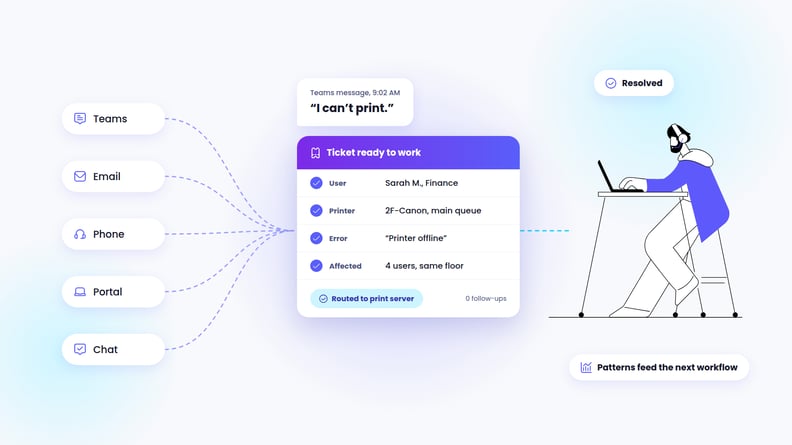
A client messages you on Teams: “I can’t print.”
Simple, right?
Except now the service desk must figure out whether there’s already a ticket, which user and device are affected, whether it’s a one-off problem or the first sign of something bigger, and whether there’s enough information to actually do something with it.
A ticket exists, but the MSP still doesn’t have what it needs to work it. That gap is where many MSPs lose time, and it’s easy to miss because they’re often measuring the wrong things.
Most service desks focus on speed and closure rates: time to first response, time to resolution, and tickets closed per tech. Those numbers matter, but they only show what happened after the ticket was already workable. They don’t show how the request showed up in the first place or what happened before a technician ever touched it.
If MSPs want to scale the service desk instead of just running it faster, they need to understand that earlier part of the ticket lifecycle first.
Where requests actually start now
Tickets arrive through far more than the portal now. For instance, they may show up in email, phone calls, Teams messages, chat, or informal client conversations that someone logs later.
Giving clients more ways to reach the service desk may be more convenient for them, but it can also make consistency harder for the MSP. Every channel captures a different amount of context. One request might arrive with screenshots, device details, and a full explanation. Another might be a five-word Teams message that leaves the service desk guessing.
So, how can an MSP bring this all together?
The answer usually starts before any new tool or channel. MSPs need to know where requests are actually entering the business today, where context falls out along the way, and what stops the team from acting on a ticket when it lands.
That means looking at which channels create the most back-and-forth and which request types are regularly missing information. It also means knowing where technicians have to stop and reconstruct what the client meant before they can start solving the issue.
The best process meets clients where they already are, but it only helps if it makes the request clearer and easier to act on.
Capturing a ticket doesn’t mean it’s ready to work
A common service desk mistake is treating ticket creation as progress on its own. If a ticket is missing the basics, the team still has to reconstruct what the issue is, who it affects, and where it needs to go before anyone can address the actual problem.
Every MSP has a handful of request types that make up a large share of ticket volume, such as password resets, printer issues, access requests, and other repetitive tasks. For each of those common request types, MSPs should define what “enough information” looks like.
The goal is to capture just enough to route the request, automate part of it, or hand it to the right person without another round of back-and-forth with the client.
A useful way to define that threshold is to work backward from the next action. The team should know who’s affected and what system or device is involved, with enough context to decide what happens next. If technicians still have to chase down basic information before they can begin, intake hasn’t done its job yet.
Take the printer ticket. “I can’t print” is not workable. The same request becomes workable with four things: which user, which printer or queue, what the error on screen actually says, and whether anyone else in the office is affected. That last one decides everything downstream. One user is usually a driver or a mapping problem, four users is the print server. A technician who has those four fields can start. A technician who has “I can’t print” has to send an email and wait.
Good intake is the difference between having a ticket and having a ticket the MSP can actually do something with.
Start automation with the work you already repeat
MSPs often get automation backwards by starting with, “How do we automate the whole desk?” The problem with that question is it makes automation feel like one giant project instead of a series of smaller workflow decisions. That’s when the whole effort stalls before anything ships.
A better starting point is the repetitive work the team already handles the same way, over and over, every day. That repetition is the signal.
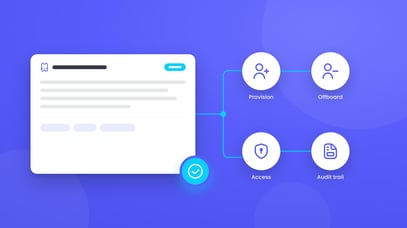
Before automating a common request, such as a user access request, look at how often it comes in and how consistently the team handles it. If technicians usually have the information they need when the request comes in and follow the same process each time, that’s a good candidate for automation. But if they still have to investigate further during intake to get the information they need, the workflow probably isn’t ready for automation yet.
Risk matters too. MSPs need to understand what happens if an automated action goes wrong and decide in advance where the system should stop and hand the work to a person.
Automation should take the routine grind off the service desk. It shouldn’t replace the relationship clients have with the MSP. The goal is high-quality, consistent, fast service, with a person stepping in when it matters most.
The ticket still has value after it’s closed
Closing a ticket resolves the immediate issue, but the information inside that ticket can still tell the MSP something useful.
The bigger value is in what patterns across many tickets reveal about the MSP’s business and the client experience. Repeated issues may point to a root cause that needs attention. Inconsistent resolutions expose a documentation or process gap. A steady stream of similar manual work shows where standardization or automation could help.
Most MSPs already have this data sitting in their PSA, but many don’t look back at it once the ticket is closed. When that happens, the service desk loses the chance to use yesterday’s tickets to improve tomorrow’s workflow.
Map the workflow before you pick the tool
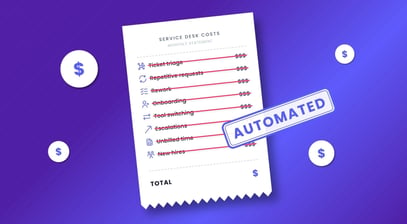
MSPs can’t scale a service desk by telling technicians to close tickets faster. That creates a treadmill with no strategy behind it. Scaling means understanding the full path a ticket takes, from the first client request through resolution and what the MSP learns afterward.
The practical next step is to map that workflow end to end and find the places where friction is actually happening. Maybe requests regularly arrive without enough context. Maybe certain steps are handled differently depending on the technician. Or maybe the team is spending time on work that follows the same pattern every time. Once those friction points are clear, MSPs can modernize one stage at a time.
Technology has to earn its place in the MSP stack. The MSPs getting real value from automation are the ones that understand their workflows well enough to know exactly where to apply them.
That’s the order that works: understand the workflow first, then apply the tool.
Ready to see where your tickets lose time? Book a 30-minute discovery call and we’ll map it with you.
Not ready to talk yet? See how MSPs use Pia to resolve tickets faster.