
Pia Chat Add-on

Don't just chat about the ticket. Automate the resolution.

Pia Chat puts your service desk inside Microsoft Teams — where your clients already work. From first message to closed ticket, in one seamless flow.

What changes for your MSP

Less overhead. Better service. At any scale.

Pia Chat doesn't just add a channel. It changes how work moves through your business. Requests resolve inside the conversation, your team focuses on what actually needs them, and your service desk scales without your costs following

comment-smile (2)

Clients get answers without
waiting for a human.

From their first Teams message, Pia Chat takes the request, logs the ticket, and resolves it automatically. They're in the queue. They just never feel it.

user-up

Your best people deserve better
than routine requests.

Pia Chat owns first-line resolution so your engineers stay on the work that actually needs their expertise. Less noise. More output.

shield-check-1

Service quality that doesn't
depend on who's on shift.

No dropped requests. No off-hours gaps. No quality variance between your A-team and whoever picks it up next. Pia Chat delivers the same standard every time.

chart-mixed-up-circle-dollar

Take on more clients
without adding headcount.

Every new client adds revenue, not overhead. Pia Chat absorbs the volume so your growth stops being limited by how many people you can hire.
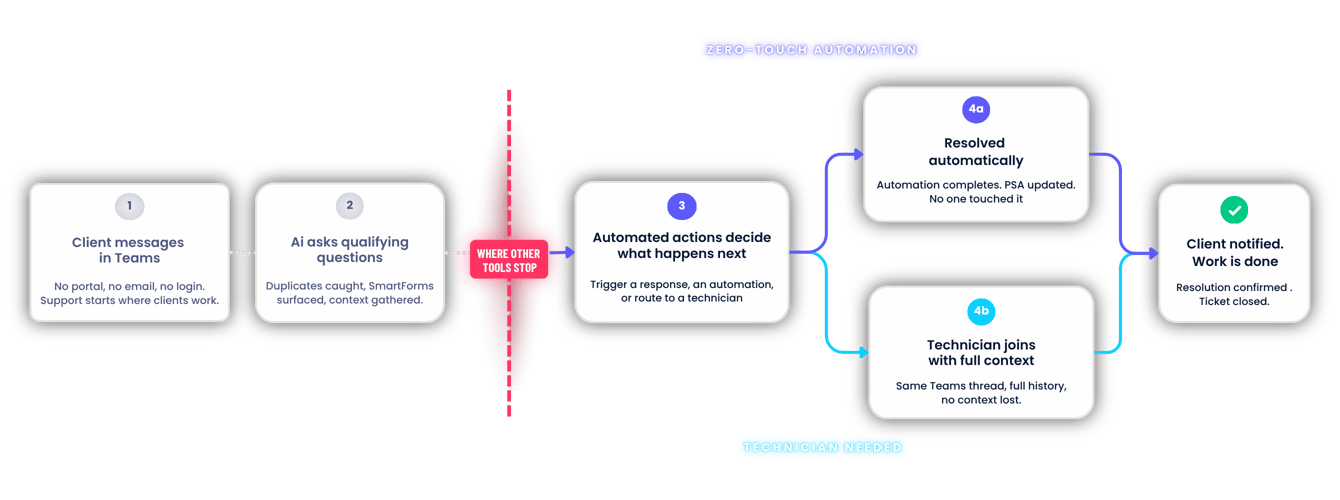
Don't just chat about the ticket — automate the resolution
THE RESOLUTION FLOW
See the full journey — every request triaged, automated where possible, and handed to your team where it matters. Either way, it ends with a closed ticket.
Pia Chat How it Works
Built to resolve. Not just route.

More than a chat tool. A full-service delivery layer inside Teams.

Some tools route the ticket. Others host the portal. Pia Chat does both — and then automates the resolution.
01

Clients self-serve through SmartForms.
Right inside Teams

Clients are guided through SmartForms directly in Teams. Common requests are resolved without your team touching them. Simple, structured, and built into the conversation.
02

AI Resolution Assist.
Always on, always consistent.

A built-in resolution assistant that lifts the heavy load off your team. It collects key details, guides clients through a SmartForm, and enables zero-touch resolution in seconds.
03

Automated Actions.
Teach the AI, then let it act.

Teach Pia how to handle your clients' most common requests. It can respond with links, collect details via SmartForms, or trigger a full automation to resolve the issue

04

Branded per client. Configured once.
Works automatically.

Set custom welcome messages, branding, and intake workflows per client. Each end user gets a tailored experience that feels built for them. Your team sets it up once and moves on.

Pia Chat FAQs

Got questions about how Pia Chat works, what it needs to run, or how your data is handled? Here's what MSPs most commonly ask before getting started.

Is my data mixed with other MSPs' data? Is the LLM trained on MSP data?

No. Your data is not mixed with other MSPs'. The LLM powering Pia Chat is delivered through the Microsoft Azure platform. We will update the model as better ones are proven. We've chosen Microsoft because of its strong commitment to data security and privacy. Microsoft does not share customer data between tenants, nor does it use customer data to train AI models or pass it back to LLM builders.

Does the LLM retain or store our data?

No, we have purposely partnered with Microsoft for this reason.

Who pays for LLM usage?
LLM usage is included with your Pia Chat subscription. There are no separate usage-based AI charges.
Do you provide audit logs for chat activity?
Yes - Microsoft Teams chats can be setup to capture automatically as internal notes in tickets within the PSA.
What does my team need to set up Pia Chat?

Microsoft Teams, Microsoft Licensing & Pia

How long does it take to get up and running?

2 Minutes per client if you are fast / Under an hour for a small to medium MSP

Can we roll it out to specific clients first?

Yes, you can enable Pia Chat per client

What happens if a client raises a request that Pia Chat can't resolve automatically?
PiaChat will log it as a ticket with the conversation attached so an Engineer can begin working on it.
Does Pia Chat replace our PSA?

No, it integrates with it

Can we brand it for each client?

Yes you can brand globally and then override on a per client basis

How much does Pia Chat cost?

Pia Chat is $10/month per client, added on to your existing Pia Platform subscription. LLM usage is included — no separate AI charges, no per-user fees. If you're on the Pia Platform Standard Plan, Pia Chat plugs in as a single line item.

backgroundImage

Your clients are already in Teams. Your service desk should be too

Book a call and watch Pia Chat triage, automate, and resolve a request in real time — from one Teams message