
Last month, you had a "good" week.
The queue stayed manageable. No one felt underwater. A few meaningful projects actually moved forward.
Then Monday hit.
Three onboarding tickets dropped at once. Someone's locked out (again). Tickets are bouncing between boards while the client waits for an update.
That's when most MSPs start seriously looking at AI workflow automation.
Not because it's trendy, but because the service desk is at capacity. Things start to feel fragile.
AI and automation can absolutely help.
But only if the right foundation is already in place.
Without it, automation doesn't create scale. It creates faster chaos.
What being "ready" for AI workflow automation looks like for MSPs
Readiness comes down to three things. Your processes are repeatable, your data is trustworthy, and your team is bought in.
It starts with your processes. Not the ideal version you wish you had, but the ones your team actually follows today.
- How do tickets enter the system?
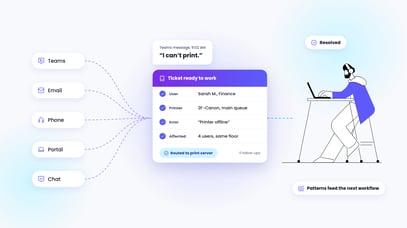
- What information does a tech need before they can take action?
- Where does something stop being standard and become an edge case?
If two technicians handle the same ticket differently because the process lives in their heads instead of in documentation, automation won't fix that. It will just make the inconsistency permanent.
Next is data.
Most MSPs underestimate how much ticket structure matters. Categories, subcategories, priorities, and routing rules all tell automation what's normal and what's an exception. If that taxonomy isn't consistent, AI has no stable signal to work from.
The same goes for documentation.
If your SOPs are outdated, your KB articles contradict each other, or your runbooks only make sense to the person who wrote them, automation has no reliable source of truth.
Your documentation should reflect how work is done today. Not six months ago.
Finally, there's the human side.
Automation is a big change, and people are naturally wary of change.
When technicians see AI as something being imposed on them, adoption can slow or stop entirely. The teams that succeed treat automation as a shared effort, not a leadership-only initiative.
They bring technicians in early. They create space for feedback. They stay transparent about what's being automated and why.
When technicians see their input shaping the automation strategy, resistance drops. Automation stops feeling like something being done to them and starts feeling like something being built with them.
The 5 workflows almost every MSP should automate first
One of the biggest mistakes MSPs make is starting with something flashy.
Your first automations should be boring.
Really boring.
Because boring usually means repetitive, predictable, and time-consuming.
Those are the tickets draining your desk every day.
If you could take these off your techs' plates, capacity opens fast. Think about how much time they'd have for higher-value, profit-driving projects.
Here's where to start:
1. Password resets
These tickets are high-volume, highly predictable, and low-risk with proper guardrails in place. Every manual reset interrupts someone's day. Automating them doesn't just save time; it restores flow across the desk.
2. New user onboarding
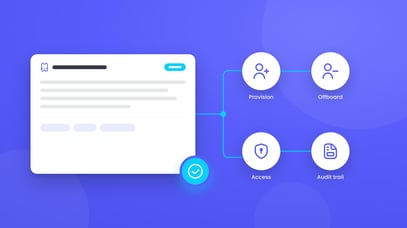
The steps are repeatable and easy to validate. When handled manually, these tickets eat hours. When automated with clear approvals and checkpoints, they become less stressful, more consistent, and less likely to break.
3. User offboarding
This is where inconsistency creates real risk. Missed permissions, lingering access, and incomplete deprovisioning don't just slow the desk down; they expose clients to risk. Automation ensures every termination follows the same documented path, every time.
4. License adds and removals, especially when they impact billing
Managing licenses manually can lead to billing errors and significant rework.
Standardizing it keeps invoices accurate and avoids awkward corrections.
5. Structured intake controls
This one's the least glamorous, but the most important. When required fields, categorization, and routing logic are enforced before automation even runs, every downstream workflow is safer and more predictable.
Even small gains compound quickly. If techs save a minute per ticket, that adds up fast. Clients also enjoy more consistent experiences and outcomes.
Win-win.
Your pre-automation readiness checklist
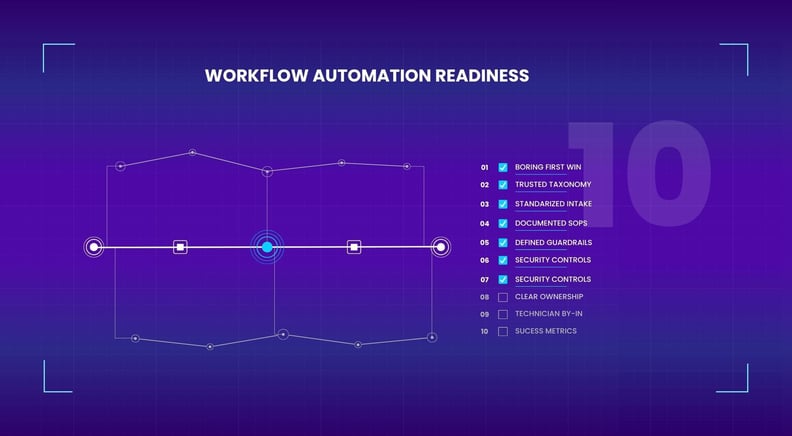
To make sure you stay in control of your next AI workflow automation, here are 10 fundamentals your service desk must have in place.
This is not about perfection. It's about control - reducing risk and increasing confidence before automation workflows touch live systems.
1. Boring first win
Start with a ticket your team handles constantly, and that follows the same workflow every time. The goal is consistency, not complexity.
2. Trusted ticket taxonomy
Categories, priorities, and routing rules should mean the same thing to every technician. Tickets don't get misrouted, mislabeled, or stuck in the wrong queue.
3. Standardized intake process
Required fields exist and are consistently filled out. "Mystery tickets" don't slip through without the information automation depends on.
4. SOPs for your most common tickets
SOPs reflect how work is actually performed, not an idealized version of the process.
5. Clear execution and escalation rules
Everyone knows when automation should execute independently and when it should escalate to a human.
6. Guardrails with defined approvals
Approval paths, human touchpoints, and rollback procedures are clearly defined before anything runs unattended.
7. Documented security and compliance controls
Leadership can answer where data goes, how actions are logged, and how automation aligns with client and regulatory expectations.
8. Clear ownership and accountability
Someone is accountable for automation planning, iteration, and reporting. It's not a side project with no driver.
9. Technician buy-in and visibility
Techs have input into what gets automated and how, and there's a regular feedback loop to improve workflows.
10. Defined success metrics
SLA attainment, MTTR, escalation rates, CSAT, touches per ticket, and capacity created are defined before you start, not after.
If several of these aren't in place yet, that's not a failure. That's clarity.
And clarity is exactly what prevents AI workflow automation from feeling like another implementation fail.
Pia: Built by MSPs who are workflow automation nerds
Pia was built by MSPs who understand that automation isn't a one-off project. It's an operational shift.
With 60+ out-of-the-box automations designed for real service desk workflows, Pia follows your process from start to finish. You can launch trusted workflows quickly, define where human approval is required, and set clear guardrails before anything runs unattended.
Whether you're building your first automation or scaling your tenth, we're ready when you are. Schedule a demo and see what getting it right from the start actually looks like.