.png?width=70&height=70&name=Aron-Hardy-Bardsley-Pia-CTO-%20(1).png)
Building software for MSPs is a humbling experience. You just can’t fake your way through it.
Anyone who’s spent time on a service desk or worked inside a complex client environment knows how unforgiving the real world is. Things break, people improvise, logic gets messy, and the “textbook version” of a workflow almost never matches reality.
Pia’s Automation Hub is something we’ve wanted to build for a long time. Not because it belonged on a roadmap, but because MSPs kept showing us where the gaps were.
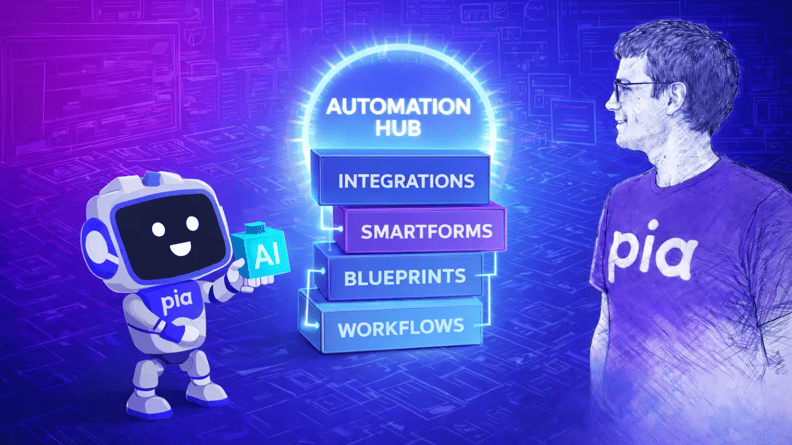
The idea behind Pia’s Automation Hub is simple. Automation should be discoverable, installable, customizable, and transparent.
Most importantly, it should reflect the environments MSPs actually support, not the environments vendors wish they supported.
If you want to see Pia’s Automation Hub in action, the full walkthrough is available in our launch webinar recording. And if you prefer reading, here’s the thinking behind what we built and why.
Why Pia’s Automation Hub needed to exist
When we released our core catalogue of 60+ out-of-the-box automations, the focus was on solving the universal problems every MSP faces: onboarding, offboarding, password resets, user checks, and the repetitive tasks that every service desk handles daily.
These workflows helped remove a lot of noise and manual effort.
But as we worked more closely with partners, a pattern emerged. The core automations solved the shared challenges, yet each MSP still needed workflows that fit the systems they supported.
Google Workspace was a perfect example. For some MSPs, it was essential, while for others, it wasn’t part of their world at all. The same applied across other tools and processes. What one MSP relied on every day, another rarely touched.
It became clear that a single, fixed automation catalogue couldn’t serve everyone with the same level of impact.
Partners needed a way to access automation that matched their environments and priorities. This also needed to be easy to browse, which is why the full list of available packs is always accessible in the PiaPacks Library.
That is what led us to build Automation Hub.
The engineering problems we set out to solve
As we shaped the early design, we kept returning to three challenges that partners raised again and again.
The first challenge was timing. MSPs needed a way to access new automation the moment it was ready. Some workflows were urgent, others irrelevant.
Waiting on platform-wide releases slowed things down. We needed a way for MSPs to install what they needed on their own timeline.
The second challenge was transparency. Partners wanted a clear understanding of what an automation did before turning it on for any client.
They needed visibility into configuration steps, logic, exceptions, and any required permissions. They also wanted the ability to test things safely. That meant more clarity, not more guesswork.
The third challenge was update control. Some teams moved fast. Others needed to validate changes in more complex or sensitive environments.
To respect both, we added version information, release notes, and the option to revert to a previous version if something did not behave as expected.
All of these conversations shaped the design of Automation Hub. Instead of delivering automation only through releases, the Hub lets partners choose what they want to install, when they want to install it, and how deeply they want to review or modify it.
How discovery and installation actually work
When you open Pia’s Automation Hub, the first goal is simple: help you find what you need, quickly and confidently.
We organized the layout around how technicians actually search for solutions.
There’s an Editor’s Choice area that highlights commonly used automations such as compromised account handling, data archiving during offboarding, or reducing noise in alerts. Each automation includes a clear explanation of what it does and why it matters.
Every PiaPack includes a clear description of what it does and why it matters, so partners know exactly what to expect before deployment
There’s also a trending section that shows what other MSPs are downloading. This is not about promoting anything. It’s about giving partners visibility into what the broader community currently finds useful.
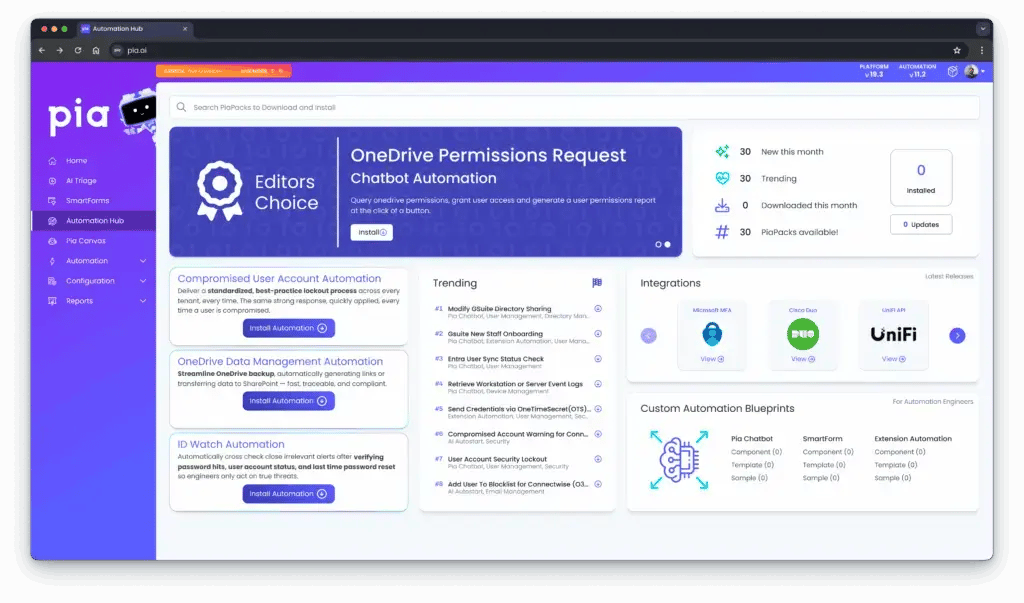
On the side, you’ll find integrations. These are PiaPacks that rely on specific systems or APIs, including tools connected to Google Workspace, Duo Security, or other providers.
Selecting an integration shows you the relevant automations so you can immediately see what fits the systems you support.
Blueprints are another part of the Hub that partners have found helpful. They are examples and templates that show how automations are structured.
They help new builders understand the basics and give experienced builders a starting point for more complex workflows.
The installation process is designed to be straightforward. You choose the components you want, select which clients they apply to, configure any extension points, and enable the automations that matter to you.
Everything is built to give partners control without adding unnecessary complexity.
How the community shaped the Hub
The community played a significant role in shaping how the Automaton Hub works. Many of the ideas came directly from partners who shared their processes, gaps, and the steps they wished could be automated.
We saw how different MSPs approached the same task in different ways. Some focused heavily on Google-related workflows. Others relied more on Microsoft permissions or unique combinations of systems.
Partners also shared the detailed steps their senior technicians followed during sensitive workflows. These examples helped us understand where automation should be flexible and where it should be opinionated.
We also heard the need for faster iteration. Partners wanted automation delivered more frequently, not only during major releases. The Hub is designed to support that pace and make it easy for partners to install updates as soon as they are ready.
What does this changes for MSPs
Automation Hub gives MSPs more control, more flexibility, and more visibility over what runs in their environments.
You decide what to install and when. You can test before enabling. You can update or roll back on your own terms. And you can adopt automation that fits the systems you actually support.
It also helps us share improvements faster. When partners identify a workflow worth automating, we now have a way to deliver it quickly and make it available to everyone who needs it.
If you want to explore the Hub or discuss how automation can support your workflows, you can book a demo. We always appreciate hearing how partners are using the platform and what they want to automate next.